
News & Insights
AI Chatbot Development: Process, Cost & What Actually Ships
On Digitals
03/07/2026
16
AI chatbot development is the process of building and maintaining a conversational AI system for customers or employees. In 2026, that usually includes a language model, business knowledge, human handoff, security controls, and sometimes secure actions through CRM or internal systems.
Quick Answer
A production AI chatbot needs
- defined business goal
- clean knowledge sources
- grounded responses
- controlled integrations
- evaluation
- security testing
- ongoing monitoring
Start with a narrow use case, then expand from support or lead qualification into more complex agent-like workflows only when the data and governance are ready.
Key takeaways
- Start with a business problem, not a model or framework.
- Build retrieval, evaluation, and human escalation before broad automation.
- Treat tool access, MCP servers, and customer data as security decisions.
What is AI chatbot development?
AI chatbot development is the work of creating a chatbot that can generate responses and guide users toward an answer or next action.
This approach goes beyond writing a welcome message. Therefore, a production chatbot needs:
- a defined scope
- trusted knowledge
- conversation logic
- integration rules
- monitoring
- ownership after launch
In fact, a basic chatbot may answer FAQs or route visitors to a department, while a generative AI chatbot can understand natural-language questions and produce flexible responses, and an AI agent goes further by using tools and multi-step decision logic to complete a task.
Chatbots vary from business requirements. If firms only need to answer FAQs or route visitors to a department, a basic one is enough. Meanwhile, once the requirements become complicated, generative AI chatbot or AI agent would be the best choice.
When generative AI chatbots can understand natural-language questions and produce flexible responses, AI agents go further by using tools and multi-step decision logic to complete a task.
Microsoft distinguishes agents from simple text-generation chatbots because agents can call tools and sometimes act without a visible chat interface.
For most businesses, the first release shouldn’t be a fully autonomous agent. A more reliable starting point is a grounded chatbot that answers from approved knowledge and transfers complex, sensitive, or low-confidence conversations to people.
What types of AI chatbots can you build?
Businesses can build several chatbot types, from simple scripted flows to tool-using AI agents.
| Type | How it works | Suitable use case |
| Rule-based chatbot | Follows predefined flows and choices | FAQs, routing, lead forms |
| Conversational or NLP chatbot | Recognises intent and language patterns | Common support and service questions |
| Generative AI chatbot | Uses an LLM to generate responses | Product guidance, internal knowledge, research support |
| RAG chatbot | Retrieves approved business content before answering | Documentation, policy, technical support, ecommerce content |
| Agentic chatbot | Uses tools and workflows to complete actions | Booking, account support, CRM updates, order workflows |
| Voice chatbot | Combines speech recognition, AI, and text-to-speech | Call-centre triage, booking, accessibility use cases |
One highlighting note is that a business doesn’t need the most advanced model for every task.
What features should an AI chatbot include?
A useful AI chatbot should combine accurate answers with controlled customer journeys. The core features usually include:
- knowledge retrieval
- conversation memory
- identity awareness
- human handoff
- action permissions
- analytics
- safeguards that prevent unsafe actions
For customer-facing chatbots, the most valuable capabilities are often:
- Grounded answers with page, document, or policy references
- Lead qualification and intelligent routing
- CRM, help-desk, booking, or ecommerce integration
- Multi-language conversation support
- Live-agent handoff with conversation context
- Role-based access to private information
- Conversation analytics and failed-answer reporting
- Guardrails for pricing, compliance, refunds, or sensitive advice
Last but not least, remember that customer problems should be prioritized in the feature list.
What business benefits can AI chatbot development deliver?
AI chatbot development can improve service consistency and access to business knowledge when the system is connected to a clear workflow. The benefit does come from automating repeatable work while helping people focus on decisions and relationship-sensitive conversations.
The strongest use cases usually improve one or more of these areas:
- Faster response to high-intent visitor questions
- More qualified leads routed to the right sales team
- Lower manual workload for recurring support questions
- Better consistency across policies, product information, and service guidance
- Easier access to internal knowledge for employees
- More structured insight into customer questions and content gaps
Evidence from customer support supports the AI-assisted human model. Research published by the Stanford Digital Economy Lab and MIT studied 5,172 support agents and found that access to a generative AI assistant increased issues resolved per hour by 15% on average.
The largest gains appeared among less-experienced and lower-skilled workers, while the study also found evidence of improved customer politeness and fewer requests to speak to a manager.
One of the highlights is that the study measured an internal agent copilot, not a website widget. It shouldn’t be presented as a guaranteed chatbot ROI figure.
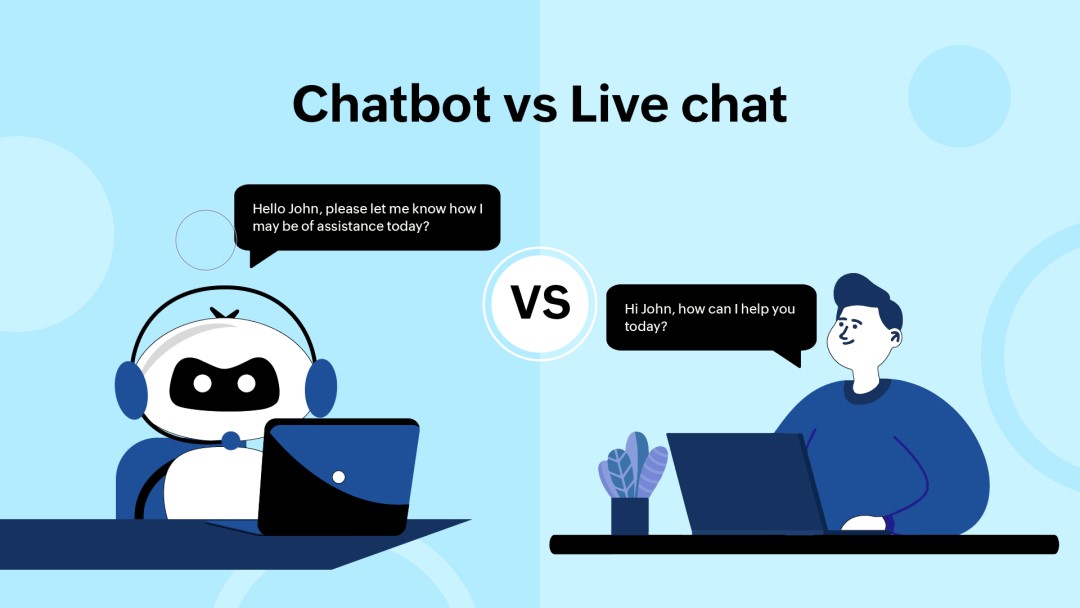
However, in general, the research reinforces a practical decision – businesses should compare chatbot vs live chat as a hybrid design question instead of a replacement question.
What are common AI chatbot use cases?
AI chatbots can support customer service and operational workflows. The most successful use cases usually have approved source data, measurable outcomes, and a defined escalation path when the chatbot cannot answer safely.
| Function | Example chatbot use case | Success metric |
| Customer support | Answer policies, product questions, order status | Resolution rate, handoff rate |
| Sales and lead generation | Qualify leads, recommend services, schedule calls | Qualified leads, meeting bookings |
| Ecommerce | Compare products, answer delivery and return questions | Assisted conversion, cart recovery |
| Internal knowledge | Find policies, procedures, technical documents | Time saved, answer accuracy |
| Healthcare administration | Route appointment and non-clinical enquiries | Booking completion, reduced call volume |
| Financial services | Explain non-sensitive products and processes | Faster service, compliant escalation |
| Education | Guide learners through enrolment or course content | Enquiry resolution, application completion |
How do you build an AI chatbot step by step?
AI chatbot development should follow a staged process:
- define the business goal
- prepare knowledge
- choose the right model and architecture
- connect tools carefully
- test against realistic conversations
- monitor performance after launch
Skipping the early discovery and evaluation work usually creates a chatbot that looks impressive in a demo but fails in production.
1. Define the problem and scope
Business should start with one clear job. Examples include:
- reducing repeat support questions
- qualifying B2B leads
- helping customers compare products
- helping employees find internal guidance
You can write down what the chatbot must answer, what it may assist with, and what it must send to a person. Avoid starting with “we need an AI chatbot” without defining the customer or operational problem.
2. Audit the knowledge and data
After clarifying problems, your next move is to:
- review website pages
- product data
- policy documents
- help-centre articles
- CRM fields
- internal files
This step helps you identify and remove duplicate, outdated, contradictory, or unapproved content, which benefit the following actions.
Remember that the chatbot will only be as dependable as the sources it can retrieve. Therefore, data ownership also matters. Someone must be responsible for continuously updating policies, rules and business processes after launch.
3. Choose the model and retrieval approach
- The most efficient approach is to choose an LLM based on:
- language quality
- latency
- sost
- privacy requirements
- tool support
- deployment constraints
Then decide whether the chatbot needs basic prompting or a combination.
For most business knowledge applications, retrieval-augmented generation is a stronger starting point than fine-tuning. RAG retrieves relevant current content at query time, while fine-tuning is more useful when the system needs to follow a consistent style, format, or classification behaviour.
4. Build the knowledge and retrieval layer
For chatbot accuracy, businesses should split source content into useful chunks, add metadata, generate embeddings, and store the information in a searchable system. Metadata can include
- language
- customer type
- product category
- access level
- publication date
- policy region
- service line
A separate RAG chatbot guide can explain the retrieval architecture and citation design in more detail.
5. Add actions and integrations carefully
One common misunderstanding is that the more integration the more productivity is to the chatbot. In fact, you better connect only the systems the chatbot genuinely needs. Examples include:
- a CRM for lead routing
- a help desk for ticket creation
- a booking system for appointments
- ecommerce data for product and order support
Companies also avoid giving the chatbot broad write access simply because an API is available. High-impact tasks such as refunds, cancellations, account changes, contract commitments, or customer emails should use limited permissions and human approval.
6. Build the conversation and interface
Companies, then, can design
- chatbot’s tone
- welcome state
- suggested questions
- fallback messages
- citations
- handoff experience
The interface should make it easy to ask for a human rather than forcing the visitor through a broken automated flow.
7. Evaluate, secure, and test
You can then create a test set from available data. Test for factual accuracy, correct source retrieval, harmful output, privacy leakage, unsupported promises, prompt injection, and failed tool calls.
The strongest evaluation set includes questions the chatbot should refuse or escalate, not only questions it should answer successfully.
8. Deploy, monitor, and improve
Launch with analytics that track customer outcomes: resolution, handoff, lead quality, source clicks, repeat questions, user satisfaction, latency, and error rate. Review failed conversations regularly and update the knowledge base, prompts, workflows, and permissions when business conditions change.
What technology stack is used for AI chatbot development?
A modern AI chatbot stack combines a frontend chat experience, backend orchestration, LLM provider, retrieval layer, data sources, integrations, identity controls, and monitoring.
The exact tools vary, but every production chatbot needs clear ownership of these layers.
| Layer | Main purpose | Typical choices |
| Chat interface | Website widget, app chat, messaging channel | React, web component, iframe, mobile SDK |
| Backend and orchestration | Prompt handling, routing, tool logic, sessions | Custom API, LangChain, LlamaIndex, agent frameworks |
| Language model | Generate, classify, summarise, reason | Hosted LLM API or private model deployment |
| Retrieval layer | Search approved knowledge | Embeddings, vector database, keyword search, reranker |
| Business data | CRM, CMS, catalogue, help desk, internal docs | Salesforce, HubSpot, Shopify, Zendesk, databases |
| Tool integration | Read or act across systems | APIs, function calling, MCP servers |
| Identity and controls | User authentication and permissions | SSO, OAuth, role-based access |
| LLMOps and analytics | Logging, testing, monitoring, cost control | Tracing, evaluation datasets, dashboards |
The stack should be designed around the task. For example, a website FAQ chatbot may need only a CMS and chat widget, while a customer-account assistant may require authentication and tighter separation between reading data and changing it.
How is AI chatbot development changing from chatbot to AI agent?
AI chatbot development is shifting from simple conversation flows toward task-specific AI agents that can retrieve information, choose tools, and carry out controlled actions. That shift does not mean every chatbot needs autonomy. It means development teams must decide which tasks should remain conversational and which tasks can safely become automated workflows.
Gartner’s 2026 CIO and Technology Executive Survey found that 17% of organisations had already deployed AI agents, while more than 60% expected to deploy them within two years. Gartner also forecast that 40% of enterprise applications would include task-specific AI agents by the end of 2026, compared with less than 5% in 2025.
The practical distinction is simple:
- A chatbot answers a question.
- An assistant helps a person complete a task.
- An agent can plan and take approved actions across tools.
The safest path is progressive. Start with knowledge retrieval and human handoff. Add actions only after the business has verified data quality, identity checks, approval logic, and monitoring.
What is MCP and why does it matter for chatbot development?
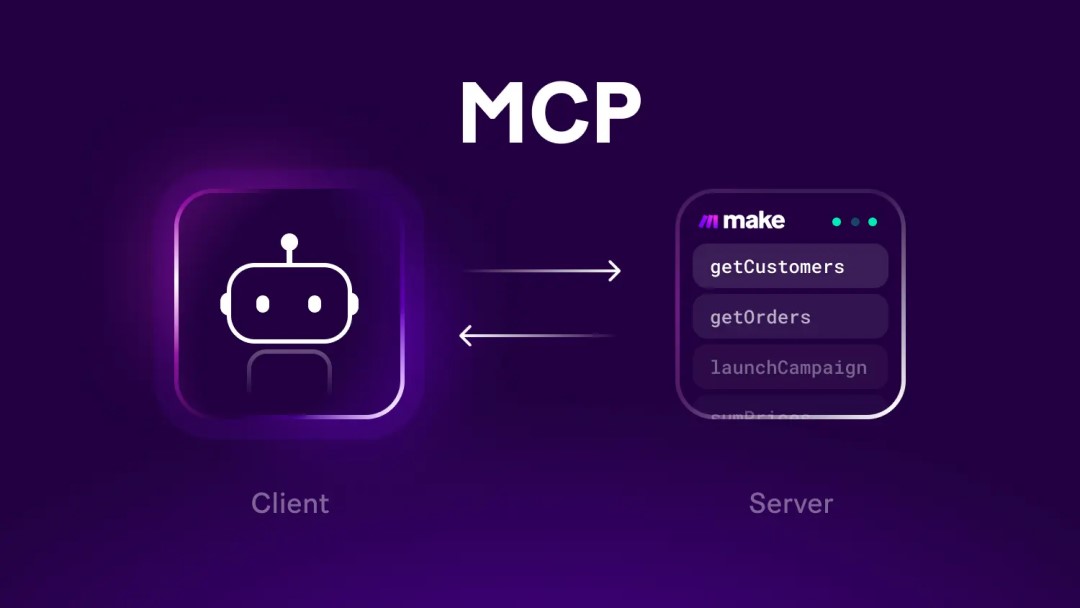
Model Context Protocol, or MCP, is an open standard for connecting AI applications to external data sources and workflows. It matters because it can reduce the need to create a separate custom integration for every combination of CRM and business tool.
MCP doesn’t replace APIs or RAG, RAG retrieves information to improve an answer. MCP standardises how an AI application can discover and use tools or data sources, including systems that can return current information or complete an approved action.
Anthropic introduced MCP in November 2024. By December 2025, Anthropic said the ecosystem included more than 10,000 public MCP servers, support across products such as ChatGPT, Gemini, Microsoft Copilot, and Visual Studio Code, plus over 97 million monthly SDK downloads across Python and TypeScript.
OpenAI added remote MCP-server support to the Responses API in 2025, while Google and Microsoft now publish MCP documentation and infrastructure for agent integrations.
MCP is useful when a chatbot needs a consistent way to access CRM data or internal information. It should still be implemented with strong authentication, tool restrictions, audit logs, and careful approval rules.
Why do many AI chatbot projects fail?
Many AI chatbot projects fail because the business starts with technology enthusiasm rather than a specific workflow, measurable outcome, trusted data source, and operational owner. A chatbot can produce fluent answers quickly, but production value depends on accuracy, integration quality, governance, and whether the business can maintain the system after launch.
Gartner predicted that more than 40% of agentic AI projects would be cancelled by the end of 2027 because of escalating costs or inadequate risk controls. Its 2025 analysis also warned that only about 130 of thousands of vendors presenting “agentic AI” capabilities had significant agentic functionality.
IBM’s 2025 CEO study found that only 25% of AI initiatives had delivered expected ROI, while only 16% had scaled enterprise-wide.
The common causes are usually practical:
- Unclear business problem
- Weak or unowned knowledge sources
- No evaluation before launch
- Too much tool access too early
- Missing human escalation
- No measurement beyond conversation volume
- Vendor selection based on demos rather than workflows
A production chatbot needs business ownership as much as technical ownership. Sales, support, product, legal, IT, and content teams may all own part of the answer quality.
How do you keep an AI chatbot accurate?
AI chatbot accuracy depends on
- source quality
- retrieval quality
- prompt design
- evaluation
- chatbot’s willingness to say it cannot verify an answer
RAG can reduce hallucination risk by retrieving relevant company content, but it cannot guarantee that the selected content is correct, current, complete, or interpreted perfectly.
Anthropic’s Contextual Retrieval benchmark found that adding document-level context to chunks reduced failed retrievals by 49%. Combining contextual retrieval with reranking reduced failed retrievals by 67% in Anthropic’s benchmark. These are vendor benchmark results, not a promise of the same gain for every business.
A practical accuracy system should include:
- Approved source content with named owners
- Metadata for market, language, product, and permissions
- Hybrid retrieval using semantic and keyword search
- Reranking for stronger source selection
- Source citations for high-impact answers
- Evaluation questions based on real customer conversations
- Safe fallback language when evidence is weak
- Regular re-indexing after policy, product, or service changes
For complex document libraries or multi-step research workflows, agentic RAG may help the system decide which sources or tools to use. It also adds latency, cost, and more failure paths, so it should be introduced only when standard RAG cannot solve the business need.
How do you secure and govern an AI chatbot?
AI chatbot security needs to be designed into the system from the beginning because the chatbot processes untrusted user input and sometimes action-taking tools. RAG and fine-tuning may improve relevance, but they don’t fully protect a system from prompt injection, data leakage, or unsafe actions.
OWASP lists Prompt Injection as LLM01:2025. It warns that attackers can manipulate model behaviour through direct user inputs or indirectly through content such as webpages, documents, files, and other material the model consumes. OWASP also states that RAG and fine-tuning do not fully mitigate prompt injection vulnerabilities.
The main security controls should include:
- Keep model keys and private logic on the server
- Treat user input and retrieved documents as untrusted
- Apply least-privilege access to every tool and integration
- Separate read permissions from write permissions
- Require confirmation or human approval for high-impact actions
- Limit exposure of customer, employee, and financial data
- Log tool calls, sources, actions, failures, and unusual requests
- Test indirect prompt injection before every major release
OWASP’s 2026 exploit roundup includes examples involving prompt injection, sensitive-information disclosure, excessive agency, and improper output handling. This is why an AI chatbot should never receive unrestricted access to a CRM, inbox, database, or payment workflow.
How much does AI chatbot development cost and how long does it take?
AI chatbot development cost depends on scope, knowledge quality, integrations, security requirements, languages, user volume, and whether the chatbot only answers questions or can complete actions. The visible chat interface is usually a small part of the work. Data preparation, retrieval, testing, integrations, evaluation, and support often determine the real effort.
| Delivery scope | Typical delivery window | Main cost drivers |
| Proof of concept | 2-4 weeks | One narrow use case, limited content, basic chat interface |
| Grounded website chatbot | 6-12 weeks | RAG, CMS integration, analytics, handoff, evaluation |
| Integrated support or sales assistant | 2-4 months | CRM, help desk, authentication, multiple data sources |
| Action-taking AI agent | 3-6 months or phased rollout | Tool permissions, approvals, audit logs, workflow testing |
| Enterprise-scale programme | Multiple phases | Security, compliance, multilingual support, observability, governance |
These are planning ranges, not fixed quotes. A chatbot that answers from public content can be delivered far faster than one that accesses authenticated customer accounts or changes business records.
Budgeting should cover four areas:
- discovery and design
- build and integration
- ongoing model and infrastructure usage
- maintenance after launch
The lowest-cost build is rarely the lowest-cost system over time if it produces poor answers, creates support escalation, or needs to be rebuilt when data and workflow requirements grow.
Should you build, buy, or hire an AI chatbot development company?
Buy a platform when you need a fast, standard chatbot for FAQ automation, lead capture, simple website knowledge, or existing help-desk workflows. Build custom when the chatbot must use proprietary data, respect complex permissions, connect deeply with business systems, or provide a customer experience that off-the-shelf widgets cannot support.
| Decision | Best fit | Trade-off |
| Buy a no-code chatbot | Small site, common FAQs, quick deployment | Limited control over data and workflows |
| Adopt a support platform | Existing CRM or help-desk operation | Platform dependency and usage pricing |
| Build in-house | Strong product, data, and engineering team | Requires long-term AI, security, and operational ownership |
| Hire a development partner | Complex business logic or limited internal capacity | Requires clear scope and active stakeholder involvement |
| Use a hybrid approach | Need speed now and flexibility later | Requires architecture planning from the start |
A capable AI chatbot development partner should ask about your users, existing content, systems of record, business rules, data access, success metrics, and risk tolerance before recommending a model or framework.
They should also explain:
- How retrieval quality will be tested
- Who owns the knowledge base after launch
- Which actions require human approval
- How model usage and infrastructure cost will be monitored
- What happens when the chatbot cannot answer
- How the system can evolve without a complete rebuild
Talk to On Tech about how to build a custom, grounded and secure AI chatbot that fits your website, data, workflows, and customer journey.
Frequently Asked Questions (FAQs)
What is AI chatbot development?
AI chatbot development is the process of designing, building, integrating, testing, deploying, and maintaining a chatbot that uses AI to answer questions or complete controlled tasks. It can include language models, RAG, CRM and help-desk integrations, analytics, security controls, human handoff, and workflows that match a business use case.
How long does it take to build an AI chatbot?
A simple proof of concept may take two to four weeks. A production RAG chatbot with website content, evaluation, analytics, and human handoff often takes six to twelve weeks. Systems that use authenticated customer data, multiple integrations, approvals, and action-taking workflows typically require several delivery phases.
How much does AI chatbot development cost?
AI chatbot development cost depends on scope, knowledge quality, model usage, integrations, user volume, security requirements, and maintenance needs. A public-content chatbot costs less than an authenticated support assistant or AI agent that can change account data. Businesses should budget for discovery, development, evaluation, infrastructure, and ongoing improvement.
What is the difference between an AI chatbot and an AI agent?
An AI chatbot mainly answers questions through conversation. An AI agent can retrieve information, choose tools, reason through multiple steps, and complete approved actions. Agents are more capable but introduce more security, permission, monitoring, and governance requirements than a conversational chatbot.
Should we build an AI chatbot in-house or hire a company?
Build in-house when your organisation has strong engineering, data, security, product, and operations capacity to own the system long term. Hire an AI chatbot development company when you need specialised architecture, integrations, RAG, security, evaluation, or faster delivery without building a complete internal team first.
How do you keep an AI chatbot accurate and secure?
Keep an AI chatbot accurate by grounding answers in approved current content, testing real queries, using source citations, and escalating uncertain cases. Keep it secure through server-side controls, least-privilege access, authentication, input and output filtering, prompt-injection testing, audit logs, and human approval for high-impact actions.
NEWEST POSTS
- AI Chatbot For Ecommerce: How to Choose, Launch and Scale in 2026
- Best AI Chatbot For Websites: 8 Tools Compared & When To Build Custom
- AI Chatbot Development: Process, Cost & What Actually Ships
- Chatbot vs Live Chat: Which Is Right for Your Business?
- How to Build And Integrate A RAG Chatbot Into Your Website
Read more
Tell us about your business challenge and get a tailored consultation today.