
News & Insights
How to Build And Integrate A RAG Chatbot Into Your Website
On Digitals
01/07/2026
13
A RAG chatbot is a website chat experience that retrieves approved content from your CMS, and documentation before an LLM answers. When it is built with a lightweight widget, secure API, vector search, source citations, and content syncing, it can answer customers faster without turning your site into a generic AI interface.
Quick Learning
A RAG chatbot lets a website answer questions from its own data and approved documents instead of relying only on a model’s training. A reliable build connects a lightweight chat interface to a secure backend and LLM, then streams grounded answers with sources without degrading mobile page performance.
Key takeaways
- RAG is primarily a retrieval and data-quality problem instead of an LLM choice.
- The browser should stay lightweight; keys, retrieval, and model calls belong on the server.
- Source control, retrieval testing, and security monitoring matter as much as the chat interface.
What is a RAG chatbot?
A RAG chatbot is an AI assistant that retrieves relevant information from your own website content before generating an answer. Instead of responding only from the model’s general training, it searches internal documents, then uses the most relevant evidence as context.
For a customer-centric website, that distinction matters. A generic chatbot may describe a product category in broad terms, while a RAG one can answer from the current catalogue, explain a service using approved messaging, cite the relevant policy page, or direct a visitor to the correct next step.
RAG stands for Retrieval-Augmented Generation.
- “Retrieval” means finding useful source material.
- “Augmented” means adding that material to the model prompt.
- “Generation” is the final response written for the visitor.
This makes RAG suitable for sites where accuracy, freshness, and traceable sources matter.
Why use RAG instead of a standard or fine-tuned chatbot?
RAG is usually the better option when a chatbot needs to answer from content that changes often, such as:
- service pages
- product availability
- documentation
- pricing rules
- support articles
- regional policies
It helps reduce unsupported answers because the model receives relevant context at the time of the question.
Fine-tuning still has a role, but it solves a different problem. It can help a model follow a preferred format or classification rule. However, it’s not the best default method for keeping a chatbot aligned with a frequently updated website knowledge base.
| Decision area | RAG chatbot | Fine-tuned chatbot |
|---|---|---|
| Main purpose | Retrieve current business knowledge | Adapt model behaviour or output style |
| Updating content | Re-index changed content | Retrain or run a new tuning cycle |
| Source citations | Natural fit | Usually difficult to make reliable |
| Product catalogue use | Strong, with metadata filters | Weak unless retrained frequently |
| Best use case | Website support, product Q&A, documentation | Consistent tone, structured output, classification |
Note: use RAG for facts that need to stay current; use fine-tuning only when you need the model to behave differently across many interactions.
How does a RAG chatbot work?
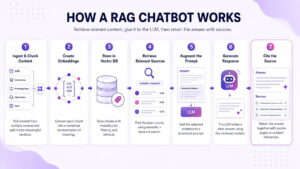
A RAG chatbot retrieves the most relevant available information for each visitor question and gives those pieces to an LLM before it responds. The system, then, should return both the answer and the source pages used to produce it.
Ingest and chunk content
The system pulls content from:
- CMS
- Ecommerce catalogue
- Knowledge base
- Help centre
- Document repository
It then splits each source into meaningful chunks, usually by heading, support topic, or section rather than arbitrary page breaks.
Create embeddings
An embedding model converts each chunk into a numerical representation of meaning. This allows the system to find content that is semantically related to a question, even when the user doesn’t use the same wording as the website.
Store content in a vector database
All necessary metadata are stored in a vector database. Metadata is essential because it lets the system filter results before it sends anything to the model.
Retrieve relevant sources
When a visitor asks a question, the system searches for the most relevant chunks. Strong implementations combine semantic search with keyword search, so important information isn’t missed.
Augment the prompt
The backend adds the selected source chunks to a carefully structured prompt. The prompt should tell the LLM to answer only from the approved evidence and say when the available content doesn’t support a confident answer.
Generate the response
The LLM writes a natural-language response using the retrieved context. Therefore, its job is to summarise the useful information clearly and point users to the right page or action.
Cite the source
A production chatbot should return source links or product references with each answer. Citations improve trust and create a practical way for users to verify what the chatbot said.
Core components and a reference tech stack
A production-ready RAG chatbot doesn’t need every new AI tool. It needs a small, reliable architecture with clear ownership for content, security, and analytics.
| Component | Role in the system | Common options |
|---|---|---|
| Embedding model | Converts text into searchable vectors | OpenAI, Cohere, Voyage, open-source embedding models |
| Vector database | Stores vectors and metadata | pgvector, Qdrant, Pinecone, Weaviate |
| LLM | Produces the final answer | Hosted model API or self-hosted model |
| Orchestration layer | Connects retrieval, prompts, tools, and evaluations | LangChain, LlamaIndex, custom service |
| Chat interface | Collects messages and streams responses | React, web component, iframe, script widget |
| Session store | Keeps controlled conversation state | Redis, PostgreSQL, managed cache |
| Observability | Tracks quality, latency, sources, failures | Product analytics, logs, tracing platform |
The right stack depends on:
- content volume
- security requirements
- development capacity
- languages
- expected traffic
If your business is using a WordPress service website with a few hundred pages, PostgreSQL with pgvector can be enough.
Meanwhile, a large ecommerce platform with frequent stock changes and role-based content may need a dedicated vector database and event-driven ingestion.
RAG chatbot architecture in a web app
A web-based RAG chatbot should separate the visible chat experience from the sensitive AI infrastructure. The visitor only interacts with a lightweight widget, and the browser never receives your LLM API key or unrestricted backend access.
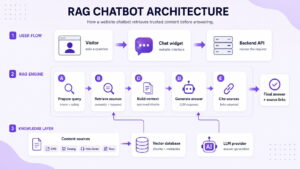
The flow is:
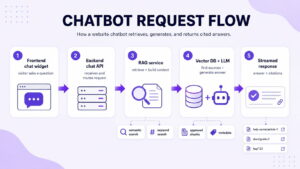
At the same time, your CMS and documentation, when the content changes, should feed an ingestion process that
- extracts content,
- creates chunks,
- generates embeddings,
- updates the search index.
This architecture gives web teams clearer boundaries:
- Frontend developers own the widget and page experience
- Backend developers own the endpoint, authentication, and streaming
- Content and SEO teams own source quality, content updates, and answer evaluation
- The business owns which content the chatbot is allowed to use
Step 1: Frontend
The frontend should make the chatbot easy to use without making every page heavier. A chatbot widget can be delivered as a
- React component;
- Web component;
- Inline script, or;
- Iframe.
Notice that each option has trade-offs.
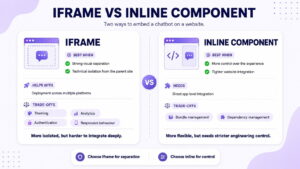
An iframe is useful when you need strong visual and technical separation from the parent website. It can simplify deployment across multiple platforms, but may make theming, analytics, authentication, and responsive behaviour more complex.
An inline component gives more control over the experience, though it requires stricter bundle and dependency management.
The important principle is to avoid loading the full chat application on initial page render. Instead, lazy-load the widget after idle time or a clear interaction. Furthermore, keep animations, third-party SDKs, and large UI libraries out of the critical path.
A RAG chatbot should support streamed answers so users see the response begin instead of waiting for the entire generation to finish. However, streaming is a UX improvement, rather than a substitute for fast retrieval or a healthy backend.
Step 2: Backend
Your chat API is the control point between the website and the RAG system. It should:
- authenticate the request where necessary,
- enforce rate limits,
- validate input,
- manage session context,
- run retrieval,
- call the model,
- stream the response back to the widget.
A typical endpoint might accept:
- User message
- Anonymous or authenticated session ID
- Current page URL or page type
- Visitor language
- Product, account, or support context
- Consent and access scope
For example, a visitor asking “Does this product work with Shopify Plus?” may need a different answer depending on the product page they are viewing and whether they are signed in.
Business should keep API keys and database credentials on the server, and don’t call the LLM provider directly from the browser. The backend should also prevent one user from retrieving content that belongs to another account.
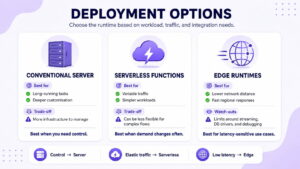
For deployment, a conventional server suits long-running tasks and deeper customisation. Serverless functions are also useful for variable traffic and simpler workloads. Developers can think of edge runtimes to reduce network distance for some use cases, but this may create limits around streaming, database drivers and debugging.
Step 3: Knowledge base
A chatbot is only as current as the content it can retrieve. As a result, businesses should treat knowledge base as a managed publishing system, instead of a one-time upload of website pages.
If you use WordPress, through the REST API or webhooks, pull:
- published pages,
- Posts,
- FAQs,
- custom fields,
- product information.
As for Shopify, those would be:
- Ingest product titles,
- Descriptions,
- Variants,
- Metafields,
- Collections,
- Availability,
- Policy content.
For documentation, use structured Markdown, HTML, or approved PDF extraction.
Each chunk should keep useful metadata, including:
- Source title and canonical URL
- Section heading
- Content type and language
- Product or service category
- Updated date
- Access scope
- Publication status
You better avoid indexing every page blindly; thus, exclude information that shouldn’t be exposed in a conversation. Those could be:
- outdated campaign pages
- thank-you pages
- unapproved drafts
- thin tag archives, etc.
The sync strategy matters as much as the initial ingestion. Any change or update should trigger re-indexing quickly enough that the chatbot does not repeat obsolete information.
Step 4: The RAG pipeline
The core RAG loop should be concise and observable:
- Receive and validate the visitor question.
- Filter sources by language, tenant, product, permissions, or content type.
- Retrieve candidate chunks using semantic and keyword search.
- Rerank the strongest candidates.
- Build a compact evidence set with source metadata.
- Ask the LLM to answer from that evidence.
- Stream the response, citations, and fallback actions to the chat widget.
The most important decision is whether the final evidence actually answers the question. A chatbot that retrieves five vaguely related pages will still sound confident while producing a weak answer.
Choose the LLM based on
- multilingual quality
- output reliability
- privacy terms
- cost structure
- tool support
The best model for a short English FAQ may not be the best model for Vietnamese product support.
Making it accurate
A useful RAG chatbot needs better retrieval than “embed every page and return the closest five chunks”.
- Semantic similarity is valuable, but it can miss exact identifiers
- Keyword retrieval is precise, but it can miss paraphrases
- Hybrid search combines both strengths.
For practical website use, start with:
- semantic retrieval
- BM25 or another lexical method
- metadata filtering
- a reranker
A reranker evaluates candidate chunks more carefully before the system sends the final evidence to the LLM.
Contextual Retrieval is another useful pattern. Instead of embedding a chunk in isolation, the system adds brief context about the parent document before creating embeddings and keyword indexes.
Anthropic reports that its benchmark implementation reduced failed retrievals by 49%, or 67% when combined with reranking. Those figures, however, aren’t a universal production guarantee, but they underline the importance of retrieval design.
Measure quality at three levels:
- Retrieval quality: Did the right source appear in the final set?
- Answer grounding: Did the answer stay within the evidence?
- Citation quality: Did the cited page actually support the answer?
Build an evaluation set before launch. Of course, you should include:
- real questions from sales calls,
- support tickets,
- on-site search,
- product enquiries,
- common objections.
Remember to add questions that should trigger a safe “I couldn’t confirm that from the available information” response. An answer that correctly abstains is better than an answer that invents a policy.
Website security
A RAG chatbot, besides being a new interface, is a new pathway into content, prompts, user data, and backend services. The security model must assume that user messages and retrieved documents are both untrusted inputs.
The main risks include:
- prompt injection hidden in retrieved content,
- poisoned knowledge-base documents,
- cross-tenant leakage,
- PII exposure,
- excessive requests to the chat endpoint,
- inaccurate answers that send users to the wrong support action.
Knowledge poisoning deserves particular attention. In the PoisonedRAG research setup, five malicious texts per target question inserted into a knowledge base containing millions of texts achieved a 90% attack success rate.
This is an experimental result under a targeted attack model. However, it shows why document ingestion cannot be treated as a harmless content task.
A practical security baseline should include:
- Allowlisted ingestion sources and role-based publishing access
- Content review and versioning for high-risk documents
- Metadata filters before retrieval, not after generation
- Separate tenant indexes or strict tenant-level filters
- Rate limits, bot controls, and abuse monitoring on the API
- PII minimisation in logs, prompts, and conversation memory
- Prompt instructions that treat retrieved text as evidence, not executable commands
- Source citations, safe refusals, and human escalation paths
Security comes from controlling who can publish source content, what the system can retrieve, which actions the model is allowed to trigger, and how quickly suspicious behaviour can be investigated.
Performance and cost on a live site
A live chatbot has several latency stages:
- Widget loading
- API connection
- Query processing
- Retrieval
- Reranking
- First token from the model
- Complete response delivery
Remember to track them separately. Otherwise, a slow answer may be blamed on the model when the real issue is a database query or oversized frontend bundle.
Streaming improves perceived speed because visitors see the response begin earlier. Still, streaming should include cancellation, timeout rules, and graceful fallback messages.
A chatbot that keeps “typing” for 30 seconds creates less trust than one that explains it couldn’t complete the request.
Firms should manage cost through focused context, not by sending the entire website into every prompt. Also, limit the final evidence set, cache safe repeated answers, store retrieval results where appropriate, and use smaller models for simple classification or routing tasks. The team shouldn’t cache responses that contain private account context.
Companies might want to use a CDN for the widget’s static assets. Keep model calls, vector queries, and sensitive logic on the server. Track page-level performance after release rather than assuming a chatbot is lightweight because it only appears as a small icon.
Deploying and maintaining a RAG chatbot
A RAG chatbot needs ongoing operational ownership. Changes and updates can all affect answer quality.
Before launch, set up:
- Separate environments for development, staging, and production
- Environment variables and secret rotation
- Logging for retrieval failures, citation gaps, and model errors
- Content-update triggers for re-indexing
- Query evaluation tests before major releases
- Alerting for unusual request volume or error patterns
- Analytics for chat starts, source clicks, fallback rate, and support escalation
For business reporting, measure more than chat volume. Useful metrics include:
- answer completion rate
- source-click rate
- unresolved-question rate
- customer satisfaction
- assisted conversion signals
- support deflection proxies
Deflection should be defined carefully. A visitor who leaves without opening a ticket is not automatically a successfully helped customer.
Do you even need RAG, or is long context or a no-code widget enough?
RAG isn’t mandatory for every website. A small and stable knowledge base can sometimes be placed directly into a long-context prompt.
Anthropic suggests that a knowledge base under roughly 200,000 tokens, around 500 pages of material by its estimate, may fit into a prompt without a RAG layer.
Long context can be simpler for a self-contained set of documents. However, it can become expensive and harder to keep fresh as the source base grows. RAG is usually stronger when content changes frequently, or the website has a large catalogue.
Research comparing long-context models and RAG doesn’t show a universal winner.
One study found long-context methods performed better overall in its benchmark, while RAG still answered some questions correctly that long-context models missed. RAG performed comparatively well for dialogue-based and fragmented information sources.
A no-code widget can be useful for validating demand or launching a simple FAQ assistant.
Just move toward a custom architecture when you need stronger content control, ecommerce data, CRM integration, custom UI, or stricter security requirements.
Agentic RAG and GraphRAG
Agentic RAG adds decision-making steps before the final answer. Instead of retrieving from one index once, the system may decide which content source to search. Businesses can use it when the chatbot must complete a multi-step task, exceeding from answering a question.
It also increases latency, cost, testing complexity, and security risk.
GraphRAG can help when the question depends on relationships between entities, such as product compatibility. So it shouldn’t be treated as an automatic upgrade.
In a 2025 page-level textbook retrieval study, conventional embedding-based RAG outperformed GraphRAG in the tested scenario, while GraphRAG brought much larger context payloads and more noise.
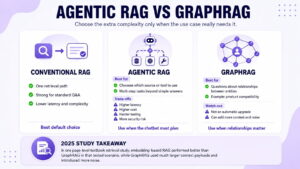
Start with strong standard RAG. Then, add agents or graph retrieval only after your evaluation set shows that ordinary retrieval cannot solve a valuable, recurring use case.
RAG chatbot use cases for websites and ecommerce
A RAG chatbot can create value when it helps visitors find accurate information faster, rather than acting as a novelty widget.
As for ecommerce, it can answer product compatibility questions, compare variants, explain specifications, and guide visitors to a relevant product page. Otherwise, in B2B services, RAG chatbot can explain service scope, industry fit, case-study details, onboarding requirements, or next steps for a consultation.
It can also support internal teams. A controlled internal RAG assistant can help sales, support, marketing, and account teams search approved knowledge without opening dozens of folders or asking the same operational questions repeatedly.
The best use case is usually narrow at first. Start with one approved knowledge domain, such as product documentation or support content. Measure answer quality. Then expand into additional content sources once the retrieval, monitoring, and ownership model is stable.
Frequently asked questions (FAQs)
What is a RAG chatbot?
A RAG chatbot is an AI assistant that retrieves relevant content from a company knowledge base before it answers. It can use website pages, product catalogues, support articles, policy documents, and approved files to produce more current, source-grounded responses than a general chatbot relying only on model training.
How do I add a RAG chatbot to my website?
Add a lightweight chat widget to the frontend, then connect it to a secure backend API. The backend handles authentication, rate limits, retrieval, LLM calls, streaming, logging, and source citations. Keep model credentials and vector database access off the browser.
RAG vs fine-tuning: which should I use?
Use RAG when the chatbot needs current website facts, product information, policies, or documentation. Use fine-tuning when you need a consistent style, classification process, or output format. Many advanced systems use both: RAG for knowledge and tuning for behaviour.
Is RAG still needed with long-context models?
RAG is still useful when the knowledge base is large, changes frequently, needs citations, or requires filters such as language, product category, user role, or tenant access. Long-context prompts can work well for smaller, stable collections of content, but they may become slower and more expensive at scale.
Is a RAG chatbot secure?
A RAG chatbot can be secure when it applies strong controls to document ingestion, user access, metadata filtering, rate limiting, logging, PII handling, and model actions. It should treat retrieved documents as untrusted evidence, not instructions, and it should never expose private content across users or accounts.
How much does a RAG chatbot cost?
Cost depends on content volume, indexing frequency, traffic, model choice, vector database, languages, support integrations, and security requirements. A simple website FAQ assistant may have a modest operating cost, while an authenticated ecommerce or B2B support system needs more engineering, monitoring, and infrastructure.
Read more
Tell us about your business challenge and get a tailored consultation today.